
Rule manager
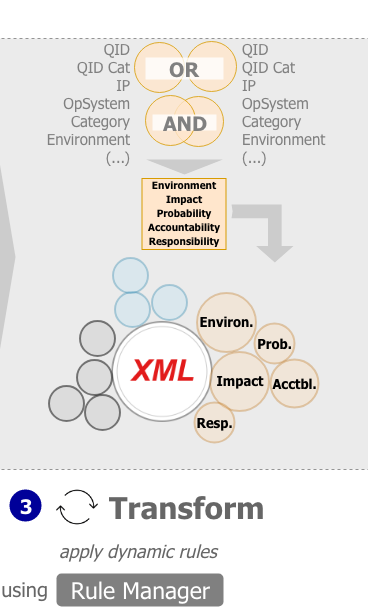
The Rule Manager represents the second step in the Attribution of XML source files.
In contrast to the static nature of the Backend Rules, the Rule Manager is home to powerful and dynamic tools that are capable to define sophisticated rule sets and satisfy complex requirements.
As the left graphic illustrates the Rule Manager complements the Attribution process with a new level of features attached to the XML source file. Starting with a basic set of attributes (Qualys ID, IP address, etc.) the file is enriched with fundamental information about the IT environment. During this step, however, we will add pieces of information that is more difficult to infer or requires to heed certain exceptions.
The Rule Manager allows to define rules, where each comprises logical statements and a truth value. Each individual rule combines up to two logical statements that can be linked with Boolean operators1 AND or OR. If the input data suffices the logical expression a result value is written to the XML attribute. Those expressions are used throughout major search engines or database queries as for e.g. libraries. Therefore you should already be familiar with it.
Although input factors for combination are limited to two components within a single rule, you can define as many rules as you require. To set an order, according to which each rule should be evaluated, you provide a sequence number. This number determines which rule is assessed first and which afterwards.
 Note: proper role authorization is required to view, edit or change any data within this module. In case you do not see the described module please approach your system administrator or authorization contact.
The Concept of Rule Definition
In principle, the setup of Rule Manager works as follows:
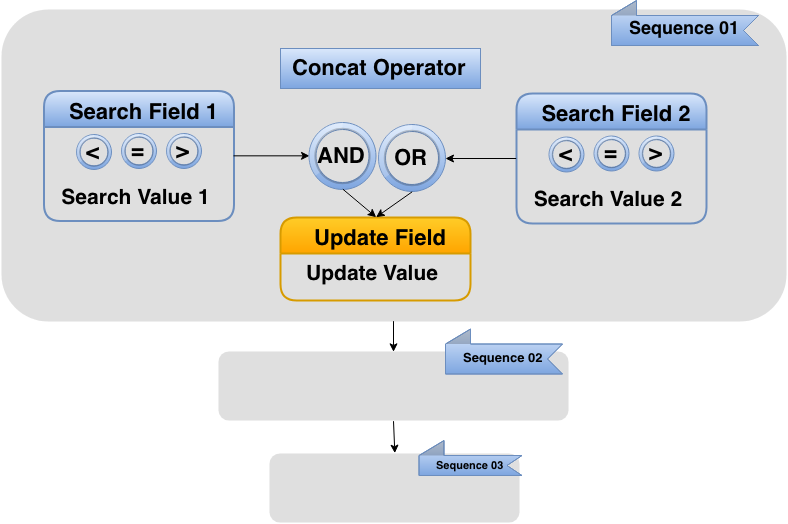
As mentioned before, rules form the basic building blocks of the Rule Manager as depicted in above illustration. In this respect, each rule is a definition of a logical statement, for which up to two input requirements can be combined.
The input requirement consists of three parts:
- Search Field: name of the attribute like Qualys ID, DNS, Environment, etc.
- Search Value: value of the attribute. For instance, environment has values like PROD, DEV or INT.
- Operator: selection requirement for the Search Value. Refer below for all possible operators.
Within a rule two input requirements are combined with the Concat Operator named AND or OR. When using AND you require that both input requirements hold true simultaneously. You are basically looking for an intersection of both terms.
Conversely, when combining input requirements using OR you are looking for values that exists in both terms independently. In fact, you are adding up the values in both terms.
When the logical definition holds true the Update Value defined by the Update Field is added to the XML attributes.
The Sequence determines the order according to which the rule is assessed with respect to all other rules.
For clarifications refer to the Use Case example later in this sections.
Input Requirement Field (Search Fields)
As input attributes - called Search Fields in the Rule Manager - you may choose from the following:
Input Requirement Field (Search Fields) |
|||
Accountability Category DNS Environment Exploit Exploits Impact |
Impact Description Intervention IP address Netbios-Name Operating System OS Group Port |
Probability Qualys Category Qualys Result Qualys Solution Qualys-ID Responsibility Severity |
Title Valuation Vendor Ref ID Zone |
Operators
To define the selection of the Search Value you can choose from the following operators:
Operators for defining Input Value (Search Field) |
|
equal to |
= |
not equal to |
!= |
greater than |
> |
greater than or equal to |
>= |
less than |
< |
less than or equal to |
<= |
is a pattern of |
like |
is not a pattern of |
not like |
Result (Update Field and Update Value)
For the result of logical combination you may choose from the following:
Update Field |
Update Values |
Environment |
|
Impact |
|
Probability |
|
Accountability |
Values are defined in transaction Accountability. |
Responsibility |
Values are defined in transaction Responsibility. |
The next section deals with a Use Case bringing more concreteness to the general handling of the Rule Manager.
1 For a brief explanation of Boolean operators refer to Wikipedia or Columbia University.
updated on: 5/9/2019 ⏐updated by: Wolfgang Stoettner ⏐ v1.0.1