
Reassigning responsibilities (role change)
In principle, each vulnerability line item falls into the accountability of one Technical System Owner (TSO). The system reflects this circumstance by showing vulnerability assignments by TSO. If required, these assignments can be changed. Should a TSO want to change an assignment he or she may address that requirement to the Vulnerability Manager (VR Manager) through the system.
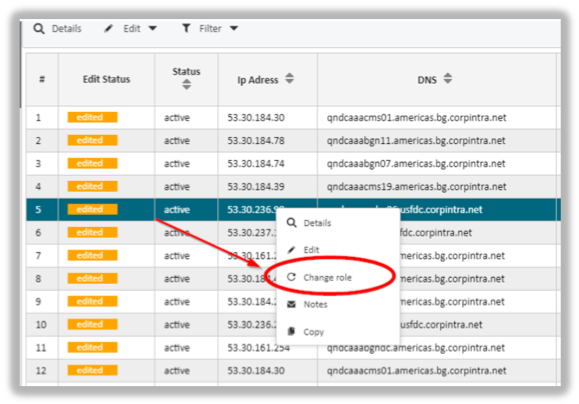
To do so, the system offers the “Change role” function. The TSO highlights a vulnerability record, calls up the context menu and selects the “Change role” entry.
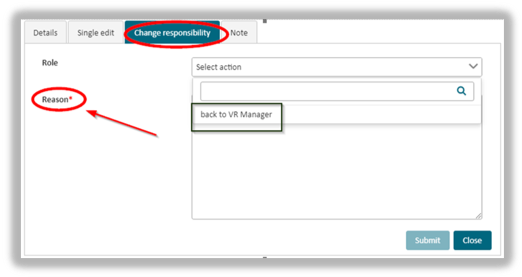
In the new dialogue window, the TSO specifies a new person who should be in charge of the vulnerability instead. He or she will have to provide a reasoning for the re-assignment by entering a short explanation in the Reason text box.
 Note: the Reason box is a mandatory field and, hence needs to be populated with text.
When submitted, this request is passed on to the VR Manager via workflow. He or she will verify the request and make a decision as to whether a new person should be assigned to the vulnerability or not.
updated on: 5/9/2019 ⏐updated by: Wolfgang Stoettner ⏐ v1.0.1