
Vulnerability
Clicking on  opens the work area that comprises all individual vulnerabilities as line item listing. The menu interface allows to edit the line item’s content, re-assign the responsibility or add a note for further information.
Each line items comprises a whole array of attributes that describe the vulnerability in detail which serves as a reference point for later assessment and categorization.
The table interface is highly flexible. Columns can be reordered to reflect individual needs as well as column width can be adjusted.
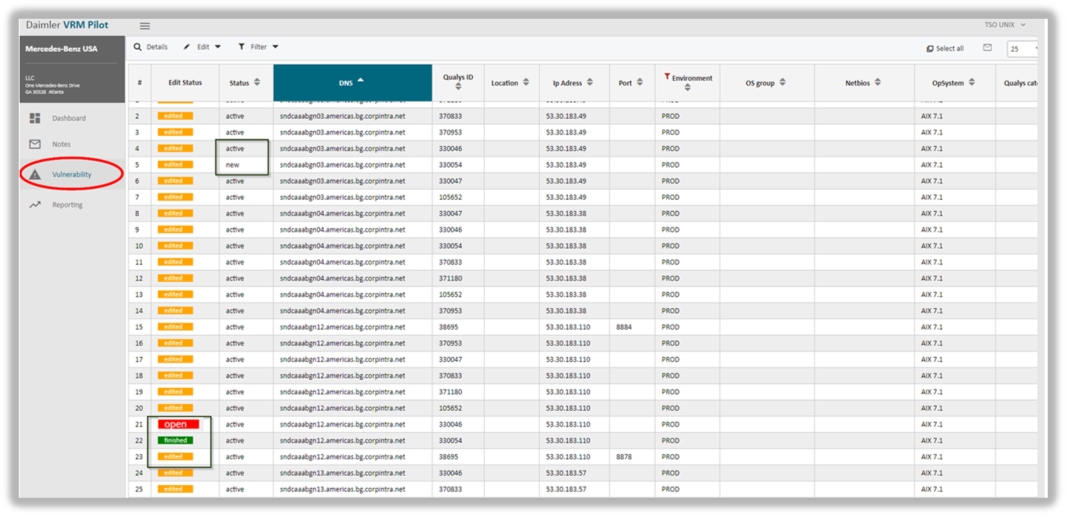
The following columns have an important bearing on the processing status of the single vulnerability:
Column Edit Status: the assessment state of a vulnerability is declared to be either open, edited or finished.
Column Status: the vulnerability is either active or new.
- Status new: the vulnerability was detected this month for the first time and was not reported last month.
- Status active: the vulnerability was already detected in one of the previous scans, however, it has not been closed up until now. For instance, the required patch to remediate the vulnerability is already available and will be applied soon.
updated on: 5/9/2019 ⏐updated by: Wolfgang Stoettner ⏐ v1.0.1