
Vulnerability details
Details of a single or group of vulnerabilities can be analyzed in a number of ways.
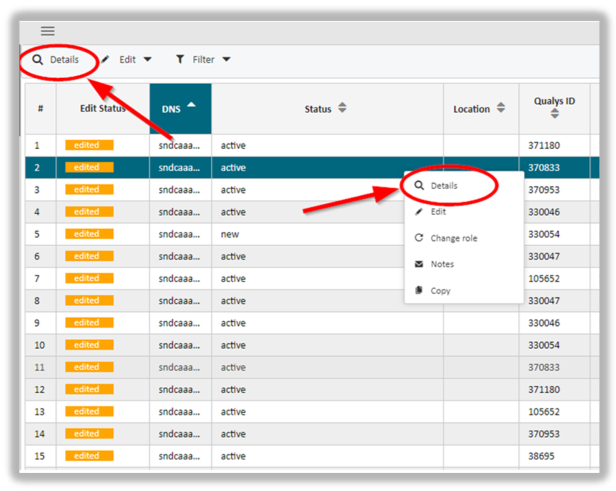
One way to do this is to mark one or more rows. In the upper tool bar click on the Details icon. Alternatively, right-click on the rows to get the context menu. Here, you will be presented with the same link to the Details menu.
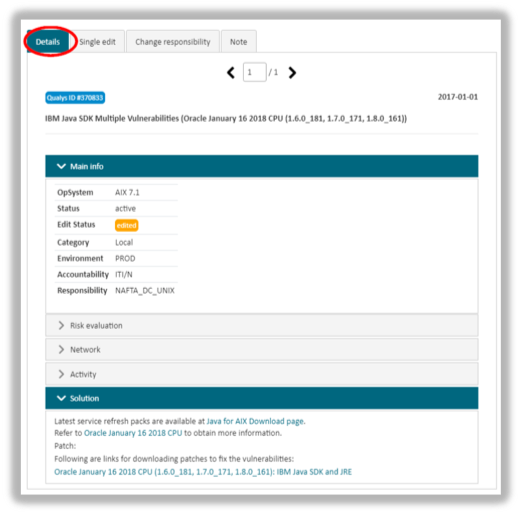
Selecting the Details menu leads to a maintenance dialogue that informs about further details of the vulnerability. The dialogue contains the following categories as shown in the next illustration:
- Main Info
- Risk Evaluation
- Network
- Activity
- Solution.
Info: this dialogue allows to edit a single vulnerability, to change the area of responsibility or to add notes.
updated on: 5/9/2019 ⏐updated by: Wolfgang Stoettner ⏐ v1.0.1