
Edit vulnerabilities
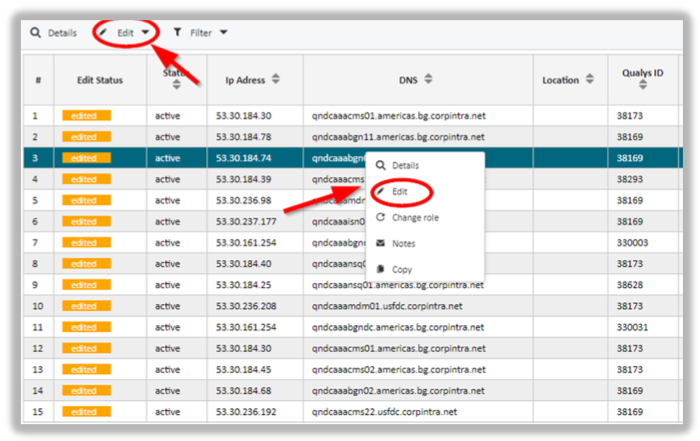
In order to edit a single or group of vulnerabilities mark the respective rows and select the Edit button in the upper tool bar. Alternatively, you may as well use the context menu and select the Edit button. Consequently, you are presented with a new pop-up window that allows you edit various criteria of the line item in a form-like manner.
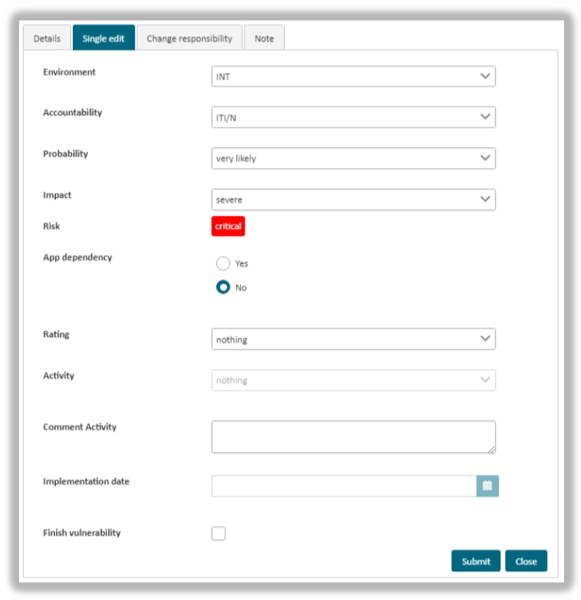
The form lists the following criteria:
- Environment
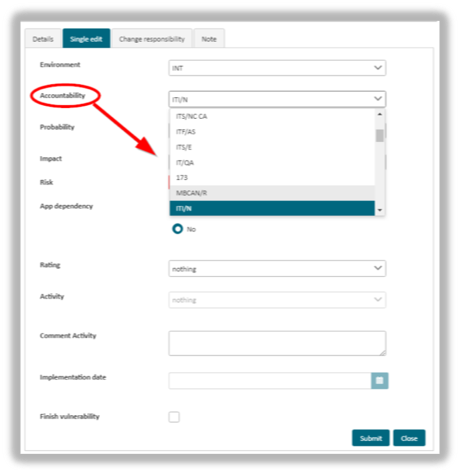
- Accountability
- Probability
- Impact
- Risk
- App dependency
- Rating
- Activity
- Implementation date
To make changes you need to set, edit or select a new value for the desired criteria. To save it please hit the Submit button.
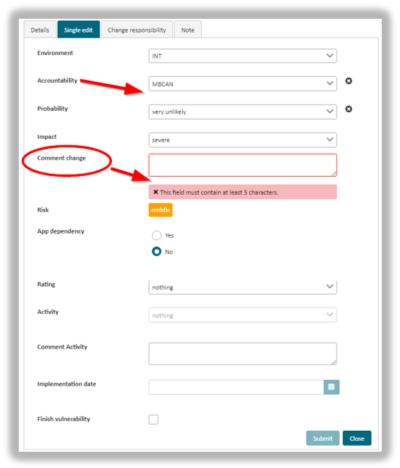
 Note: the form contains the mandatory field Comment change. It requires you to give a reason for your change
If you want the processing of a vulnerability be set to completed, place a tick at the “Finish assessment”. Otherwise the edit status will be change from “open” to “edited”, instead of “finished”
Please note:
- In order to activate any changes made within the form you need to hit the Submit button. Otherwise your changes will be lost.
- If the Qualys IDs match, several vulnerabilities can be edited simultaneously. To do this you need to multi-select them in the line item list.
- Within this dialogue you can also view line item details, alter the area of responsibility or add notes.
updated on: 5/9/2019 ⏐updated by: Wolfgang Stoettner ⏐ v1.0.1